Thursday, June 25, 2020

If you’ve not been using Opera mini browser for a while, you might want to revisit it because a lot of updates have been rolled out since you left.

If you’ve not been using Opera mini browser for a while, you might want to revisit it because a lot of updates have been rolled out since you left.

Opera Mini 50 has been rolled out to millions of Android users and opera lovers… In the major upgrade, the popular browser has fully revamped its user interface to allow its users a more personal and intuitive way to interact with the browser features they love the most.
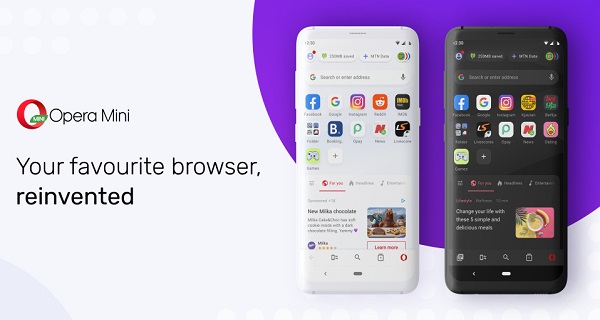


Opera Mini 50 is a small, fast, and powerful browser. It comes with unique features such as the data compression technology, a download manager with offline file-sharing capabilities, and a built-in ad-blocker.

The biggest change in the new update is made to the status bar at the top, which has been redesigned with new functionalities. It will show a variety of information like welcome messages while browsing, greetings, hints, notifications with the latest news, coming updates in the browser, or events from partners.

Along with this, the new status bar will display a Data Savings widget that shows users their data consumption at a glance. Opera claims to have the best data-saving browser on the market, with nearly 81% of mobile data on average when an extreme mode is turned on.
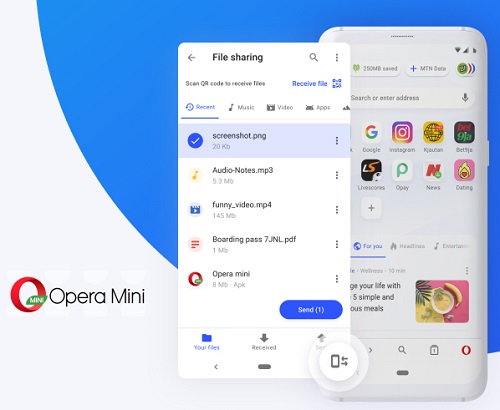


Offline File Sharing is a pretty useful feature in the Opera Mini browser that was added recently. Now, Opera Mini 50 includes a shortcut for offline file sharing on the new navigation bar at the bottom of the browser screen. From here, users can quickly share images, videos, and audio files with nearby devices at super high speeds over Wi-Fi.

Since the beginning of 2020, Opera has partnered with MTN and Airtel in Nigeria to bring free browsing up to 50MB to its users and those using MTN and Airtel networks.

Where Can I Download The Update?

You can download the latest update from Google play store here

Let us know the browser you are currently using on your smartphone in the comment.

Labels:

Another Telecom provider, Orange, is finding its way into two of Africa’s biggest markets Nigeria and South Africa

Another Telecom provider, Orange, is finding its way into two of Africa’s biggest markets Nigeria and South Africa. Orange, France’s largest telecom company is reportedly looking to make entry into two of Africa’s biggest markets, Nigeria and South Africa.

Reports say Orange CEO, Stephane Richard said the company is looking to widen its footprint in Africa by establishing a presence in these countries but this might take a few months.


It is important to note that Orange is more than capable of taking over the Nigerian market with over 266 million customers worldwide and 89,000 employees in France and 59,000 employees in other parts of the world where its operations are situated.

Although how and when these entries will take place is still unknown, but it is important to bring to your notice that Orange has once played a role in the acquisition of some telco units across Africa.

In 2016, it acquired four of Airtel’s units in Africa. Though Orange had not made any play for South Africa’s telecom market, it had previously made investments in eCommerce, WiFi access, and business services.

Also in 2016, the telecom giant invested N32.7 billion in African Internet Group (Jumia), and in 2017, when Etisalat Nigeria (now 9mobile) fell into a financial crisis, Orange was one of the investors and they purchased a 65% stake in Etisalat Nigeria.

If Orange eventually finds its way into these African markets, this may pose a big challenge to already established telecom providers like MTN, Airtel, Glo, and others. But some persons believe that Orange coming into Nigeria won’t make much of a difference.

What we are not sure of at the moment is if the company will seek a fresh entry into the market or acquire the license of any of the existing telcos like what Airtel did acquiring a license that has been passed from several telecoms starting from Econet, and 9mobile.

Orange is currently the tenth-largest mobile network operator in the world and the fourth largest in Europe after Vodafone, Telefónica, and Veon.

Labels:

Infinix in the Process of Launching its First Smart TV

After the boom of smartphones, companies around the world are now focusing on the smart TV market. Although traditional TV OEMs are favored by customers in Western markets, Chinese smartphone manufacturers have occupied a place in developing countries over the past few years.

Now, because people can access the Internet at a cheaper price than before, it makes sense for companies to bring their IoT devices to market. One of the best ways is through smart TV because it connects the whole family with the rise of OTT platforms.


Xiaomi was one of the earliest smartphone manufacturers to enter the field of smart TV. It became very popular, especially in India, and became the country’s largest smart TV brand in a short time. Globally, its market share in this area is 7%.

Now, Infinixmobility the brain behind the newly launched Infinix Note 7 is gearing up to launch its first-ever smartTV called Infinix TV S1.

No much information is disclosed about the specifications of the smartTV but being its first-ever smartTV, you should expect to see something that will wow you.

Expect to See

  1. High brightness contrast
  2. LED panel
  3. Digital process for picture and audio
  4. Support HD TV component signal input PC resolution supporting AV X 2/VGA X 1/HDMI X 2/USB X 2 Resolution: 1920*1080
  5. Brightness 250cd/m2
  6. Super slim up to 115.70mm
  7. TV system: PAL/SECAM/NTSC
  8. Sound system: B/G, D/K,
The Infinix Smart TV S1 is expected to be launched on June 25, then the price and the full specification will be unveiled. 

Labels:

Saturday, May 09, 2020

DStv, GOtv Hike Price as MultiChoice Applied 7.5% VAT – Effective from June 2020

It is so unfortunate, at this difficult time, Multichoice Nigeria has applied a 7.5 percent value-added tax (VAT) increase on all its services on DStv and GOtv package.
President Muhammadu Buhari had signed the finance bill, which increased VAT by 50 percent, into law on January 13. The new VAT regime, which sees an increase from 5 percent to 7.5 percent, came into full effect on February 1st, 2020.
Since coming into effect, MultiChoice has absorbed the 2.5 percent hike on behalf of its subscribers, an action that has kept that VAT rate at the pre-February rate of five percent.
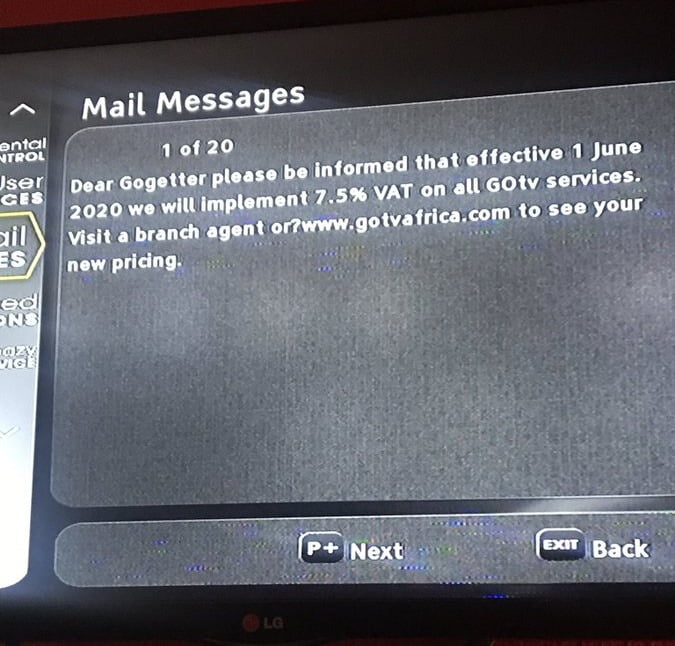
But on Thursday, some DStv and GOtv subscribers in Nigeria took to social media platforms to share screenshots of messages received on their decoders, stating that the VAT increase will be implemented across all subscriptions from June 1st.
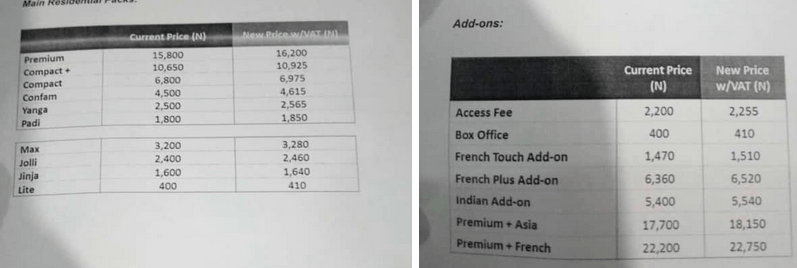
According to the text directed to customers, effective from 1st June 2020 7.5% VAT will be applied on all DStv packages… meaning you are going to be paying higher prices as seen below;

New DStv Prices Effective from June 1st

  • DStv Padi: N1800 to N1850
  • DStv Access: N2000 to N2150
  • DStv Yanga: N2500 to N2565
  • DStv Family: N4000 to N4300
  • DStv Confam: N4500 to N4615
  • DStv Compact: N6800 to N6975
  • DStv Compact +: N10,650 to N10,925
  • DStv Premium: N15,800 to N16,200

For GOtv Users, here are the Changes

  • GOtv Max: N3200 to N3280
  • GOtv Jolli: N2400 to N2460
  • GOtv Jinja: N1600 to N1640
  • GOtv Lite: N400 to N410
In my opinion, I don’t think we need to blame MultiChoice about this because sources told us that there is no way the pay television giants can continue to pay the difference between the old and the new rates for much longer, as this has impacted very negatively on its finances.
The source said: “Pay television service is not exempted from VAT and I want to believe that MultiChoice is the only company still charging the old VAT rate on its products and services. It is important to note that VAT is not part of the turnover of companies, which they, in fact, collect on behalf of the Federal Government and remit the same on a particular date.”
Nevertheless, this is not the best time for MultiChoice to increase its subscription price, knowing fully well that a lot of households are running short of finance or perhaps struggling to make ends meet.

What do you have to say about this new 7.5% VAT added to the DStv and GOtv package?

Labels:

Monday, May 04, 2020

Google Meet, Google’s newest video chat service, will soon be free for everybody.

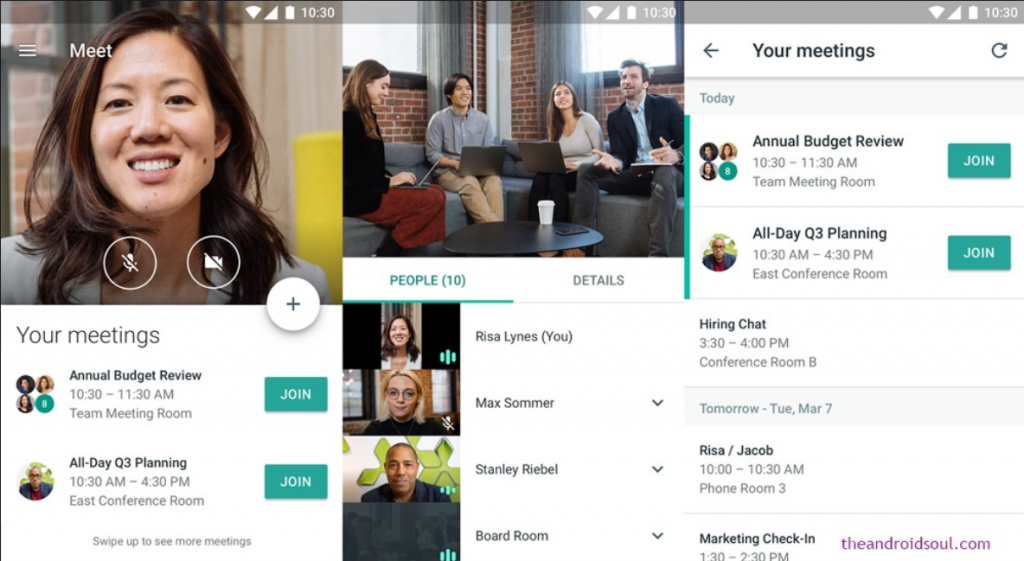
Google Meet, Google’s newest video chat service, will soon be free for everybody. The service, which was previously locked behind G Suite, is opening up to everyone with a Google account.
Hangouts Meet: Video conferences from anywhere : Intelligence Partner
COVID-19’s shelter-in-place requirements made millions of people turn to work from home. That led to a huge spike in video chat users. Teleconferencing service, called Google Meet, free to everybody, the decision takes aim at Zoom, the contender video chat service that’s become a household name during the stay-at-home era spurred by the novel coronavirus.
Before, Meet was only available to paying customers of G Suite, Google’s line of enterprise apps that includes Gmail, Drive, and Docs. Until now, anybody could join a meeting by clicking on a link, but creating a meeting required a G Suite membership.
The free version of the product requires a Google account, and video calls have a 60-minute cap. But Google said it won’t enforce that rule until after Sept. 30. The free version will also allow up to 100 participants and include features such as screen sharing and real-time captions.
Users will be able to access the service at meet.google.com or through the iOS and Android apps.
Google founder Pichai said Meet recently “surpassed a significant milestone” and is adding 3 million new users every day. Usage has increased 30-fold since January and Meet now has more than 100 million daily meeting participants.
Like Skype and Zoom, Meet will retain some premium features for G Suite customers, including dial-in phone numbers, larger meetings, and meeting recording.

How to use Google Meet, free

To sign up for the free version of Google Meet, go to the Google Meet page. Enter your name, email, country, and primary use for Google Meet (personal, business, education, or government). Agree to Google’s terms of service, and hit Submit. You’ll get a notification when the service is ready for you to use.
Once it’s available, here’s how to use the free version of Google Meet:
  • Go to meet.google.com (or, open the app on iOS or Android, or start a meeting from Google Calendar).
  • Click Start new meeting, or enter your meeting code.
  • Choose the Google account you want to use.
  • Click Join Meeting. You’ll have the ability to add others to your meeting, too.
Simple as that! Happy video chatting.
However, I think the general availability of Google Meet was too late to ride this wave for users. The work-from-home trend started two months ago when Google Meet was still locked behind the GSuite paywall. Zoom was ready and burst into the public consciousness as a result. By now, it seems like most of the people who were going to transition to a video chat app have already done so, and they picked Zoom.
Let’s hear your view about this general availability of Google Meet.

Labels: ,

Friday, May 01, 2020

Here are Some Ultimate 9Mobile Experiences during Lockdown


Here are Some Ultimate 9Mobile Experiences during Lockdown
The people have spoken, and they’re right!
9Mobile is all about making your lockdown experience easier by giving you more quality and affordable data deals and offerings that would benefit you. 
With unbelievable data offering and deals, it is more believable when you see firsthand amazing reviews from subscribers with their different lockdown experiences using 9mobile, so you too can be getting a piece of the action. 

“As an entrepreneur who sells products online, the lockdown and stay at home has put a block on my inflow of customer purchases. So; in other to stay relevant, I have to be more visible, create top of mind awareness and generate more product content showcase in other not to phase out from the minds of my customers. That means more data consumption to create more visibility online and thanks to 9mobile I have been able to enjoy quality, affordable data deals to help me reach more people and increase business revenue without any hassle.” 9mobile’s data deals are AWESOME – Entrepreneur Lola
Yes! you too can enjoy these amazing deals now by visiting: https://9mobile.com.ng/data-internet/

Here are Some Ultimate 9Mobile Experiences during Lockdown

“With limited power supply, working from home as a graphic designer was hard because my working tools needed constant access to electricity to meet up with client deadlines and that wasn’t an easy road for me. But since I started using D-light9mobile’s solar home system that offers me an affordable means of alternate electricity, I can now ensure that I have steady power supply to keep my work process easy and keep clients happy.” A well thought out solution from 9mobile- Graphic Designer Mike
Get yours now and be free from the ‘UP NEPA’ shenanigans!

Here are Some Ultimate 9Mobile Experiences during Lockdown

 “Business means everything to me and adjusting to the new normal because of the lockdown and stay at home has been a handful. Now more than ever, there is so much pressure from the business world but thanks to 9mobile’s Morebusiness Combopak Bundle, I enjoy more value on calls, Data, SMS and CUG for my Business keeping my clients, colleagues and associates happy at all times.” It’s a win-win situation for me. - Business Manager Tola.

Be up to date with your colleagues and business partners alike with our Morebusiness Combopak Bundle. Visit: https://9mobile.com.ng/morebusiness-combopak/

Here are Some Ultimate 9Mobile Experiences during Lockdown

 “The lockdown has been an eye opener for me but I get through it all by staying connected with family, friends and loved ones during these tough times; and it is all thanks to 9mobile Moreflex plus all-in-one Data and Voice plan. I connect more with Xtradata and Airtime deals at my service just by dialing *320#.” I can also share data or airtime with family and friends this period by dialing *229*pin*data size*9mobile phone number# To share data or dialing *223*Pin*Amount*9mobile phone number# To share airtime. And when I run out of options, I can borrow airtime in advance to make calls and buy data with 9mobile MoreCredit.” There is always something more with 9mobile. – Gbenga

Want to enjoy more from 9mobile Moreflex Plus? Start by visiting: https://9mobile.com.ng/moreflexplus/

Here are Some Ultimate 9Mobile Experiences during Lockdown

“As a strong believer, staying connected to my faith even in this lockdown is priority for me. I mean what shall it profit a man if he loses his faith during these difficult times, but if he attends Church services via live streams using Quality and Affordable data from 9mobile then he would continue to have unlimited access to praying and worshipping from home.” Thanks to 9mobile, all I have to do is dial *200*3*1# to enjoy worshipping God. – Mark

Great reviews mean the ultimate customer experience for 9Mobile. 9mobile is a network that is all about customer experience and feedbacks. 
It is also very important that you stay up to date with health tips, safety tips and situation reports about COVID-19 pandemic in the country. 
So; as a 9mobile subscriber, get to enjoy free access to the Nigeria Centre for Disease Control (NCDC)website and also stay updated on news and safety tips on the Coronavirus outbreak. 

Here are Some Ultimate 9Mobile Experiences during Lockdown

You too can also share your ultimate 9mobile lockdown experience via SMS, calls or 9Mobile social media platforms now. 
Stay connected!
Get in touch with 9Mobile.

Here are Some Ultimate 9Mobile Experiences during Lockdown

Labels: ,

Tuesday, March 03, 2020

We remember Apple saying its Apple Watch can make it happen as well, but they are yet to do anything about it.


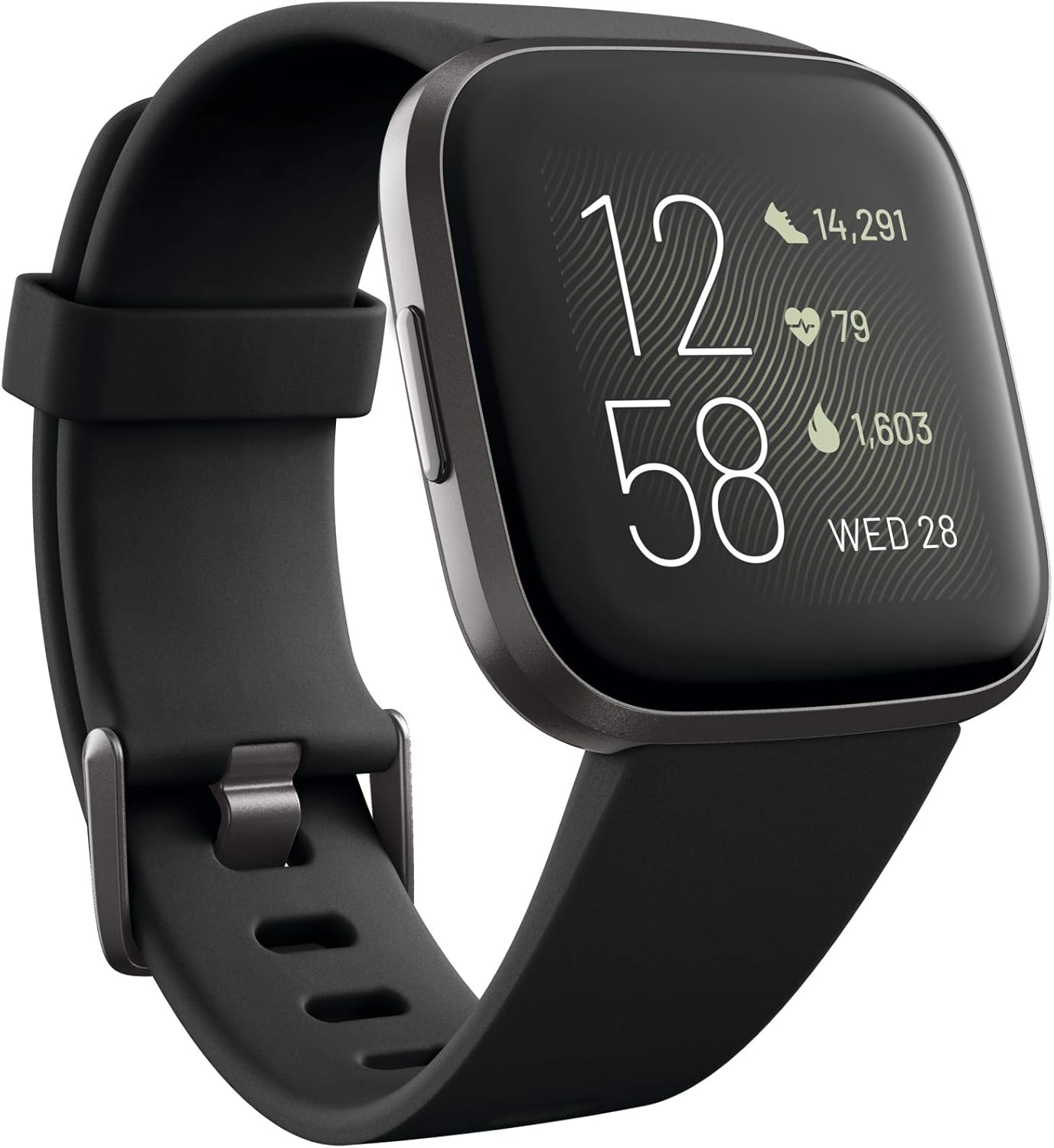
A few weeks ago, Fitbit launched blood oxygen monitoring to five of its devices, Versa, Versa 2, Versa Lite, Ionic, and Charge 3.
We remember Apple saying its Apple Watch can make it happen as well, but they are yet to do anything about it. In this article, we explore a comprehensive tutorial on how to use your Fitbit to track your blood oxygen levels:
Why is this feature vital? Because your blood oxygen levels show how well oxygen is distributed throughout your body, which is key to letting you know if your organs are functioning well.
How To Use Your Fitbit To Track Your Blood Oxygen Levels
Tracking your oxygen levels helps during a workout, to know how your body is adjusting, and during sleep, to help to detect underlying health problems that you never suspected.
Blood oxygen monitoring is available under the sleep portion of the Fitbit application and data is presented at a generalized level, therefore you should not expect to see precise levels of oxygen in your bloodstream.
 1. Ensure your app us up to date
If you use any of the 5 Fitbit devices that got the feature, ensure your application is updated with the latest software version. To confirm:
 1. Launch the Fitbit mobile application and click on the upper left corner of your avatar.
2. Choose the Fitbit device you wish to update. If you see “Update” on this mean page, it tells you that an update is available.
If you see nothing, then the application is up to date or is yet to get the Blood oxygen monitoring at the time.
If you want to update, ensure your Fitbit device is paired, placed next to your phone and has enough battery. It is best to plug it in because updates can ve very long sometimes.

2. Set it and forget it

After the update, blood oxygen monitoring is as good as activated. Just wear your Fitbit to sleep. The data would be seen under “Sleep.” in your Fitbit app when you wake up.
 To see it, launch the mobile application and check your daily summary. Sleep would be one of the categories of data monitored while you are wearing the Fitbit.
If you swipe down away from the hours tracked and sleep stages, you will see “Estimated Oxygen Variation.” Bear in mind that the feature is still getting released, so if you do not see it yet, it will soon reach you.

3. Knowing what the data means

The Estimated Oxygen Variation will be seen as a chart that reveals how much variation happened while you were asleep.
 This shows how your body is distributing oxygen in your bloodstream. Fitbit would try to generalize the data by indicating if there is a huge or little variation in your blood oxygen level. If you see persistent, huge variations in your sleep, speak to a doctor for more testing.

More Information On Fitbit:

Fitbit, Inc. is an American company headquartered in San Francisco, California. Its products are activity trackers, wireless-enabled wearable technology devices that measure data such as the number of steps walked, heart rate, quality of sleep, steps climbed, and other personal metrics involved in fitness.
Before October 2007, the company was previously named Healthy Metrics Research, Inc. While these devices appear to increase physical activities, there is little evidence that they improve health outcomes.
According to an IDC report published on December 3, 2018, Fitbit is considered the third-largest wearable company in shipments as of the third quarter of 2018, behind Xiaomi and Apple. Fitbit reports to have sold more than 100 million devices and have 28 million users. In 2019, Google announced its intention to buy Fitbit for $2.1 billion.
While these types of devices appear to be useful when used with other interventions to increase physical activity, one review of six studies found that there is little evidence that they improve health outcomes Of five studies that looked at weight loss, one found benefit, one found harm, and three found no effect. It is unclear whether activity changes occur in children and adolescents.
Fitbit has also announced that Fitbit apps will offer a more comprehensive view of menstrual cycle data, which can be monitored through the Female Health Tracking trends in the apps. This new feature is expected to be rolled out in early 2019.
There you have it – a comprehensive tutorial on how to use your Fitbit to track your blood oxygen levels. If you have any questions as regards this tutorial, feel free to drop them in the comment section below.

Labels: , , ,

Monday, March 02, 2020

Do you plan to help your kids have some major fun with your home assistant? See 7 Things Your Kids Can Ask Amazon Alexa

With virtual assistants becoming very important to our lives on a daily basis, it is not shocking that for some children, their first word might be “Alexa.” Yeah right, the Alexa brand is not for adults alone, there are several Alexa skills made especially for children to aid them to partake in the voice-activated fun as well.
Things Your Kids Can Ask Amazon Alexa

Do you plan to help your kids have some major fun with your home assistant? See 7 Things Your Kids Can Ask Amazon Alexa:
 1. “Alexa, play the podcast [name of podcast].”
Your family can get entertained with several tales and children-friendly news by asking Alexa to play a podcast.
 Echo devices make use of built-in radio application, just tune in to play the latest episodes of your preferred podcasts. To enjoy a particular episode, just use your Alexa application or add a skill like AnyPod.

2. “Alexa, play Head’s Up!”

Everyone is allowed to enjoy the popular game from The Ellen DeGeneres Show with their Alexa-enabled application. Alexa will do her best to give you hints, you just have to guess from celebrities, films, fictional characters and so on.

3. “Alexa, ask Pikachu to talk.”

Pokemon fans will fancy the interaction with this cute Electric-type Pokémon.

4. “Alexa, open Lemonade Stand.”

This brilliant simulation game of our childhoods transforms into a voice adventure as you attempt to run your personal lemonade stand.
 It never ends and gamers will earn experience badges as they hit milestones.

5. “Alexa, open Chompers.”

This Chompers podcast is a decent podcast to listen to when your children are brushing their teeth. They will be missing out on a lot of fun if they are not listening.

6. “Alexa, open Animal Workout.”

Do your kids fancy engaging in jumping jacks with a kangaroo? Or they want to do push-ups with an alligator? This entertaining workout will make your children active on a daily basis.

7. “Alexa, start SpongeBob Challenge.”

This voice-activated memory game will get your intelligence tested as you attempt to take your meal orders. It is not one to miss out on.

More Information About Alexa:

Amazon Alexa, known simply as Alexa, is a virtual assistant AI developed by Amazon, first used in the Amazon Echo and the Amazon Echo Dot smart speakers developed by Amazon Lab126.
It is capable of voice interaction, music playback, making to-do lists, setting alarms, streaming podcasts, playing audiobooks, and providing weather, traffic, sports, and other real-time information, such as news.
Alexa can also control several smart devices using itself as a home automation system. Users are able to extend the Alexa capabilities by installing “skills” (additional functionality developed by third-party vendors, in other settings more commonly called apps such as weather programs and audio features).
Most devices with Alexa allow users to activate the device using a wake-word (such as Alexa); other devices (such as the Amazon mobile app on iOS or Android and Amazon Dash Wand) require the user to push a button to activate Alexa’s listening mode, although, some phones also allow a user to say a command, such as “Alexa” or “Alexa wake”.
Currently, interaction and communication with Alexa are available only in English, German, French, Italian, Spanish, Portuguese, Japanese, and Hindi. In Canada, Alexa is available in English and French (with the Quebec accent).
Amazon developers chose the name Alexa because it has a hard consonant with the X, which helps it be recognized with higher precision.
They have said the name is reminiscent of the Library of Alexandria, which is also used by Amazon Alexa Internet for the same reason.
In June 2015, Amazon announced the Alexa Fund, a program that would invest in companies making voice control skills and technologies.
The US$200 million fund has invested in companies including Jargon, ecobee, Orange Chef, Scout Alarm, Garageio, Toymail, MARA, and Mojio. In 2016, the Alexa Prize was announced to further advance the technology.
There you have it -a comprehensive list of things kids can ask Alexa. If you have any contribution, feel free to drop them in the comment section below.

Labels: , ,

Thursday, February 27, 2020

We've known about Mozilla's VPN service for a brief period now, and now the organization has discharged an Android application for beta testing.

We've known about Mozilla's VPN service for a brief period now, and now the organization has discharged an Android application for beta testing.

Mozilla has already released a browser extension for Firefox that provides free access to the service in the US, but apps for Android, iOS, Windows, macOS, Linux, and Chromebook are also planned.

The monthly cost is currently set at $4.99 (about £4 / AU$7), but Mozilla describes this as a "limited-time beta pricing", so it's safe to assume that this will increase when the service launches properly.

The apps serve as true VPNs and offer full-device protection; they aren't just proxies that handle data from your web browser. They can be used to protect up to five devices as part of the monthly fee, and Mozilla says you'll be able to choose from servers in more than 30 countries.

Join the queue
You can download the Android app from Google Play Store Here if you have an invite to the beta program, which you can sign up for here – but bear in mind that there is currently a waiting list.

If you make it to the top of the waiting list, Mozilla will also provide access to Windows 10 app. Beta apps will also be made available for other platforms, but Mozilla hasn't yet indicated when these may be released.

Labels: , , ,

Friday, February 21, 2020

Top Apps for the Adventurous Traveller in You for 2020

pring is already here! It’s that time of the year when we start shedding our winter layers and begin work on our travel plans for the rest of the year! Whether it is a solo wellness retreat or a long family vacation, a last-minute road trip or a simple weekend getaway, it is always recommended to do some planning beforehand so that you’re not faced with any nasty surprises at the last moment. In fact, nowadays you can take the help of technology and do away with the majority of travel-related concerns. Here in this short article, we’ll acquaint you with some of the best travel apps that can be extremely helpful for the adventurous travelers among you.
Adventurous Traveller

Betway App – Ideal for killing time

What better way to savour time during your travels than indulging in some good old gambling! Betway app download can provide you with instant access to hundreds of different online casino games and thousands of sports betting markets, at any time of the day/night, wherever you might be. Regardless of whether you are a casino enthusiast or a sports specialist, the Betway app ensures that you stay close to the gambling action at all times. It’s available for both iOS and Android platforms, allowing you to access the same casino games and betting markets that are available on the desktop site.

Roadtrippers – Ideal for road trips

Well, road trips normally offer a lot of flexibility, but planning one requires a certain amount of effort. Try the Roadtrippers app next time you’re in the mood of just grabbing a car and leaving. Launched ahead of Thanksgiving in 2012, this app enables you to map your road trip, offering 7 free-of-cost waypoints. Post that you’ll get the option of upgrading.
As you go along, the app will provide you several recommendations related to the scenic stops, roadside attractions, local food options and much more. It also has pre-created guides for well-known road trips.

HotelTonight – Ideal for last minute hotel deals

Took a flight on impulse and now trying to find a place to sleep? Or perhaps you’re in the middle of nowhere and desperately looking for a hotel to stopover for the night No need to panic as HotelTonight is just the right app to rescue you from the situation. It offers a good number of last-minute hotel deals, close to your current location. These options normally range from ‘luxe’ to ‘basic’, including a good number of boutique hotels.
You can filter the options based on the number of guests, dates, and locations, also depending on whether the hotel is a pet-friendly one or not.


Meetup – Ideal to connect with the locals

There is no better way to comprehensively immerse in the culture of your travel destination than meeting up and talking with the locals. This is where the Meetup app comes into the picture. It enables you to easily connect with locals who have the same interests as you. Regardless of whether it is photography, music, sports, technology or cooking, the app can help you locate all kinds of local community events, connecting you with new friends from different places. try here

Labels: , ,

Thursday, February 20, 2020

Fonts can change the meaning of a phrase or a sentence.

Fonts can change the meaning of a phrase or a sentence. They change your reading experience, captivate the attention of readers and also leave a lasting impression about an individual or brand. In this article, we explore a comprehensive list of best fonts apps for Android Phone.
Asides all that, most people just prefer to read things in fonts they like, which is why font applications are quite popular and important. These applications make your reading easier since they give you just what you want and how you want it.

1. STYLISH FONTS


There are fifty-one fonts to select from here and a preview section that will test how your text appears in the chosen font. Appreciating and loving a particular font is solely dependent on your taste, style, and preference.
Users are allowed to download their preferred fonts before going to display under settings to apply them. STYLISH FONTS is home to a text maker section where you will be able to make use of several backgrounds for SMSes designed using different font types and sizes. The texts can then be shared on social media.

2. HIFONT


This app is home to more features than the previous option. Its fonts are cleanly arranged into several categories and the well-known ones will be seen under the “Hot” category.
The bright and stunning animal-shaped fonts are quite special as they differ from the regular dull-white fonts we are used to. To know the ones that are highly demanded, you will see the number of times they have been downloaded.

3. ENLARGE FONT

Best Fonts Apps For Your Android
Still on the topic of best fonts apps for your Android Phone, enlarge fonts is another highly recommended app. If you are making use of a mobile device that does not let you increase the font size, this is the option to go for. Users will be able to boost the size of the font from twenty percent up to three hundred percent in this app.
This should be alright for those with poor eyesight when it comes to reading things on the screen. It can be used alongside other apps on this list. Be aware that the app must be permitted to have access to the system settings before required changes can be made.

4. PHONTO


This is a popular font application for Android devices that can be used to write on pictures. Just select one from the several amazing backgrounds or use custom images and you are good to go.
 Users are even allowed to install custom fonts from the web if that is what they want. As soon as you choose a background, you can easily alter text size, position, style, tilt, and color. This app is simple to use and it saves the result in JPEG or PNG format.

5. IFONT


This app is home to a lengthy list of fonts that can be installed on your mobile device. It was developed to change and manage your system’s fonts.
There are several fonts here and they come in several languages. Ten languages are supported actually, including French, Spanish, Arabic e.t.c.

6. FONTS MATTER

Best Fonts Apps For Your Android
A font style can ruin or help the text you are trying to send. If you are installing the font on your device to alter how everything appears, painting a scary photo can make you happy again.
Everything depends on the font you select. It does not matter if you are a writer or marketer, fonts will always be key and this app gives you everything you need.

More Information On Fonts:

In modern usage, with the advent of digital typography, “font” is frequently synonymous with “typeface”.
Each style is in a separate “font file”—for instance, the typeface “Bulmer” may include the fonts “Bulmer roman”, “Bulmer”, “Bulmer bold” and “Bulmer extended”—but the term “font” might be applied either to one of these alone or to the whole typeface.
A typeface may come in fonts of many weights, from ultra-light to extra-bold or black; four to six weights are not unusual, and a few typefaces have as many as a dozen.
Many typefaces for office, web and non-professional use come with just a normal and a bold weight which is linked together.
If no bold weight is provided, many renderers (browsers, word processors, graphics and DTP programs) support faking a bolder font by rendering the outline a second time at an offset, or just smearing it slightly at a diagonal angle.
There you have it – a comprehensive list of best fonts apps for your Android Phone. If you have any personal favorites or other recommendations, feel free to drop them in the comment section below.

Labels: , , ,

Android 10 which was released last year was a major move for the operating system.

Android 10 which was released last year was a major move for the operating system. Besides the fact that we got the hotly anticipated dark mode and significant changes to the app permissions, Android 10 also denoted Google's takeoff from dessert names and introduced another Android logo/brand.

Android 10 was a cycle of growth and maturity for the operating system, and those equivalent standards are being continued to Android 11. We're as yet a couple of months out from the final build been accessible for everybody, but with a developer preview now out in the wild, we have a smart thought of where Google needs to take Android in 2020.

Eager to learn all about what Android 11 is packing? Here's All you need to know!
  • Developer Preview 1 is out
  • Top features
  • 5G Network is a big focus
  • Tons of messaging improvements
  • Permissions keep getting better
  • You can flash it right now
  • New form factors
  • Security
  • Updates and other features
  • The final build is coming in Q3
Developer Preview 1 is Now Available
On February 19, Google kicked off the hype train by releasing the first developer preview for Android 11 — giving us an early look at its biggest features and new logo.
Source: Google

Based on what we know so far, Android 11 looks to be a fairly modest year-over-year improvement compared to Android 10. At least in Developer Preview 1, there aren't any major UI changes (though this could change later on). We'll dive deeper into some of the biggest features below, with some of them being improvements to how Android handles 5G connections, support for more display types, and more powerful permission controls.

That may sound kind of boring, but don't check out quite yet. Google often keeps changes and updates coming with each new developer preview, meaning Developer Preview 1 is not indicative of what Android 11 will look like in its final form.

These are the top features

5G Network is a Big Focus
5G finally started making its way to people last year, and throughout 2020, more and more folks are going to connect to the next generation of wireless data. To help that process be as smooth as can be, Android 11 adds a very important "Dynamic Meterdness API."

That may not sound very exciting on paper, but it essentially allows phones to take full advantage of all the power 5G brings.

If the API detects that you're connected to an unlimited 5G signal, you'll access the highest possible quality for videos and graphics. The potential for 5G is pretty darn cool, and this API ensures you take full advantage of the speeds available to you.

Lots of improvements for messaging
Reading through Google's initial press release for the first Android 11 developer preview, it's obvious that this update is doing a lot to improve Android's messaging experience. In fact, there are three core upgrades that should make a big difference in your day-to-day use.

First on the list, we have chat bubbles. Similar to what Facebook's offered for years with its Messenger app onAndroid, chat bubbles in Android 11 will hide your ongoing conversations in little bubbles on the side of your screen. You can move the bubbles around, and tapping on them will reveal that specific conversation. The Bubbles API is being made available for all messaging apps, with Google encouraging developers to adopt it.

In another effort to make sure you can get to your messages as quickly as possible, Android 11 introduces a dedicated conversation section in your notification shade that'll offer instant access to any ongoing conversations you have. In theory, this should help make your messages stand out from other notifications.

Speaking of messages and notifications, Android 11 makes it possible to send images when replying to a message directly from the notification shade.

One-Time Permissions
Looking back on Android 10, one of its highlights was its improved handling of app permissions. Android 10 gave users more control over applications and what they could access, and Android 11 keeps this train rolling with a wonderful new addition.

Now, when an app asks for permission to use sensitive features like your location, microphone, or camera, you can choose to only grant it access on a one-time basis. The app will be able to use that permission during that instance of you using the app, but as soon as you leave it, the permission is revoked. The next time you use the app and it wants to use that permission, it needs to be granted access again.

Giving apps permission to these aspects of your phone should not be taken lightly, so we're thrilled to see Google giving users more control over their data like this.

You can Flash Android 11 on your phone (but you shouldn't)
Android 11 currently exists as a developer preview, and right now, it is in the earliest stage that we'll see. You can put it on your phone if you want, but we'd advise against that.

First of all, you need to manually flash Android 11 Developer Preview 1 to get it on your phone in the first place. Unlike later builds of the OS, you can't just download an over-the-air update.

Furthermore, the purpose of this initial developer preview is so developers can start working with the new Android version and get their apps ready for its final release. In other words, it's not meant for regular use on your daily driver.

With all of that out of the way, if you're dead-set on putting Android 11 on your phone right now, we have a guide walking you through the process of exactly what you need to do.

New Form Factors
As more devices with unique designs enter the market, such as vertically- and horizontally-folding smartphones, Android has evolved to include support for these new form factors.

Android 11 includes APIs which let developers optimise their applications to support these form factors, including waterfall and pinhole screen designs.

Security
Android 11 will sport improved security features, from expanded biometrics support to secure ID storage.

These changes are detailed below:
  • Biometrics – BiometricPrompt now supports three authenticator types with different levels of granularity and can be more easily integrated with different app architectures.
  • Platform hardening – Improvements to the protection of security-critical components and heap pointer tagging for catching memory issues.
  • Identity credentials – Support for the secure storage and retrieval of identification documents, such as mobile driving licenses.
Android 11 will also allow applications to share data more securely through a Blobstore Manager.

Updates and Other Features
Google said it has been working to reach a wider range of devices more quickly with its updates.

“We’re also working to make updates faster and smoother by prioritizing app compatibility as we roll out new platform versions,” the company said.

We have a few months to go before the final build
Source: Google

Android 11 may technically be available right now, but we have a ways to go before it's ready for everyone.

Developer Preview 1 is the current version, and Google will release two more between now and April. Once May rolls around, the first public beta will be made available and see two subsequent updates that focus on platform stability. Then, in Q3, the final version of Android 11 will be released to the masses.

In total, that'll see Google releasing six betas/previews leading up to Android 11 in its final form.

Developers can now visit the Android 11 developer site, download a system image for the Pixel 2, 3, 3a, or 5, and try out the new operating system.

Labels: , , ,